> ## Documentation Index
> Fetch the complete documentation index at: https://docs.nova-cloud.ai/llms.txt
> Use this file to discover all available pages before exploring further.
# Choosing a GPU Instance
> How to browse the marketplace, compare GPU offers, and pick the right instance for your workload.
Finding the right GPU instance depends on your workload, budget, and how long you need it. This guide walks you through the Nova Cloud marketplace and helps you make the best choice.
## Browsing the Marketplace
When you log into the [console](https://console.nova-cloud.ai), the Dashboard shows all available GPU offers in a card-based grid. Each card represents a server with one or more GPUs available to rent.
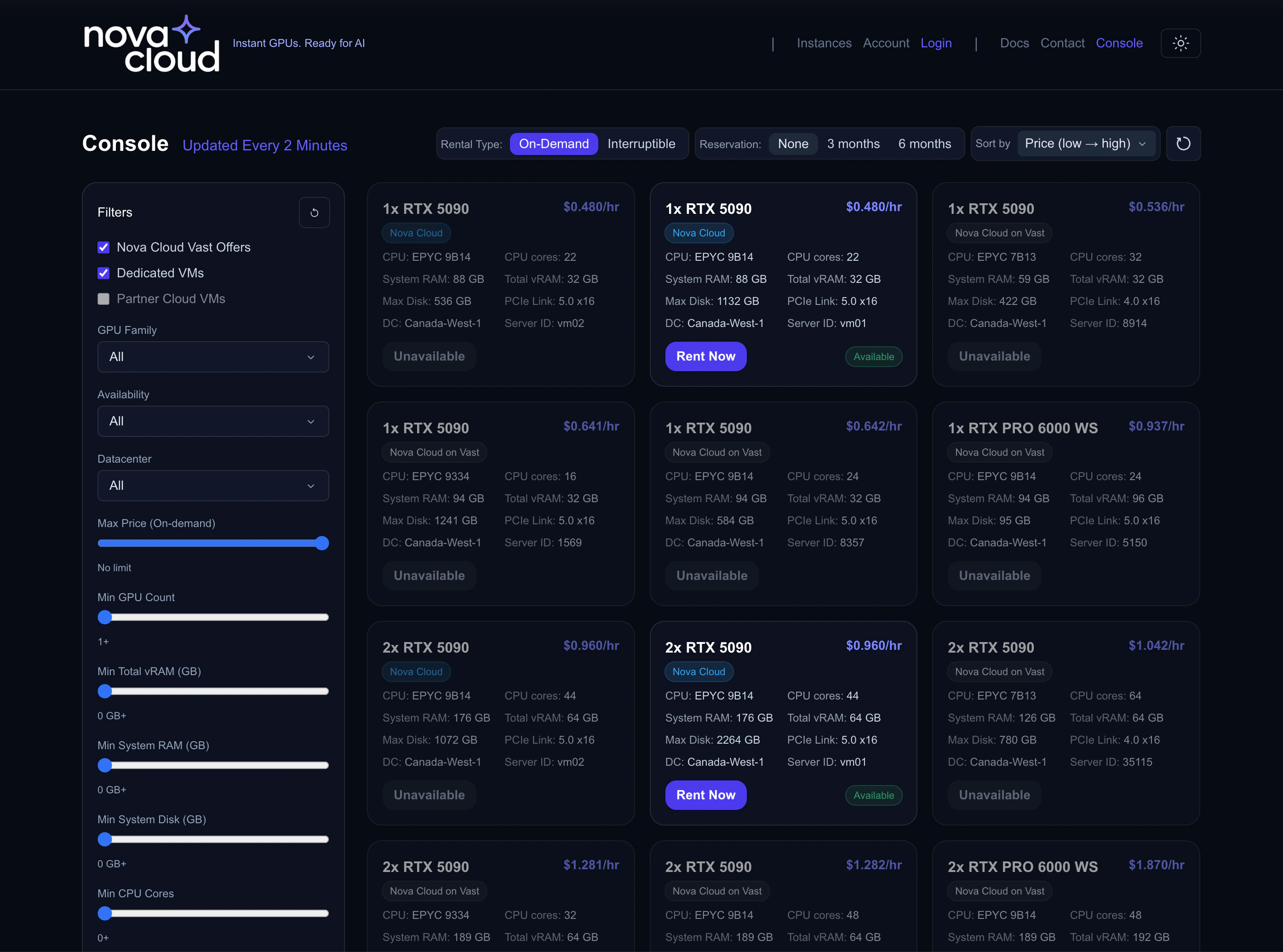 ## Understanding Offer Cards
Each offer card shows everything you need to know at a glance:
## Understanding Offer Cards
Each offer card shows everything you need to know at a glance:
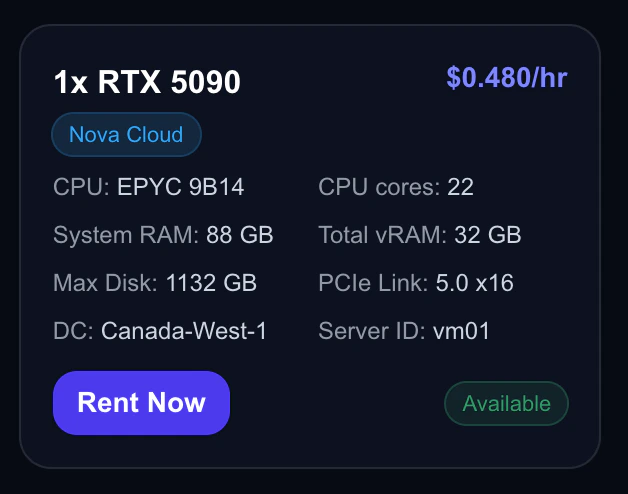 | Field | What It Means |
| ---------------- | ------------------------------------------------------------- |
| **GPU** | The GPU model and count (e.g., "4x RTX 5090") |
| **Price** | Hourly rate — discounted price shown if filtering by reserved |
| **CPU** | Processor model and core count |
| **RAM** | System memory (not GPU memory) |
| **vRAM** | Total GPU memory across all GPUs |
| **Disk** | Available storage capacity |
| **PCIe** | PCIe generation (Gen 5.0 = fastest GPU-to-CPU bandwidth) |
| **Datacenter** | Physical location of the server |
| **Availability** | Whether the offer can be rented right now |
### Offer Sources
You'll see two types of offers:
* **Nova Cloud** — Managed directly by Nova Cloud. Click **Rent Now** to create an instance.
* **Nova Cloud Partners** — Third-party marketplace offers from trusted partners.
## Using Filters
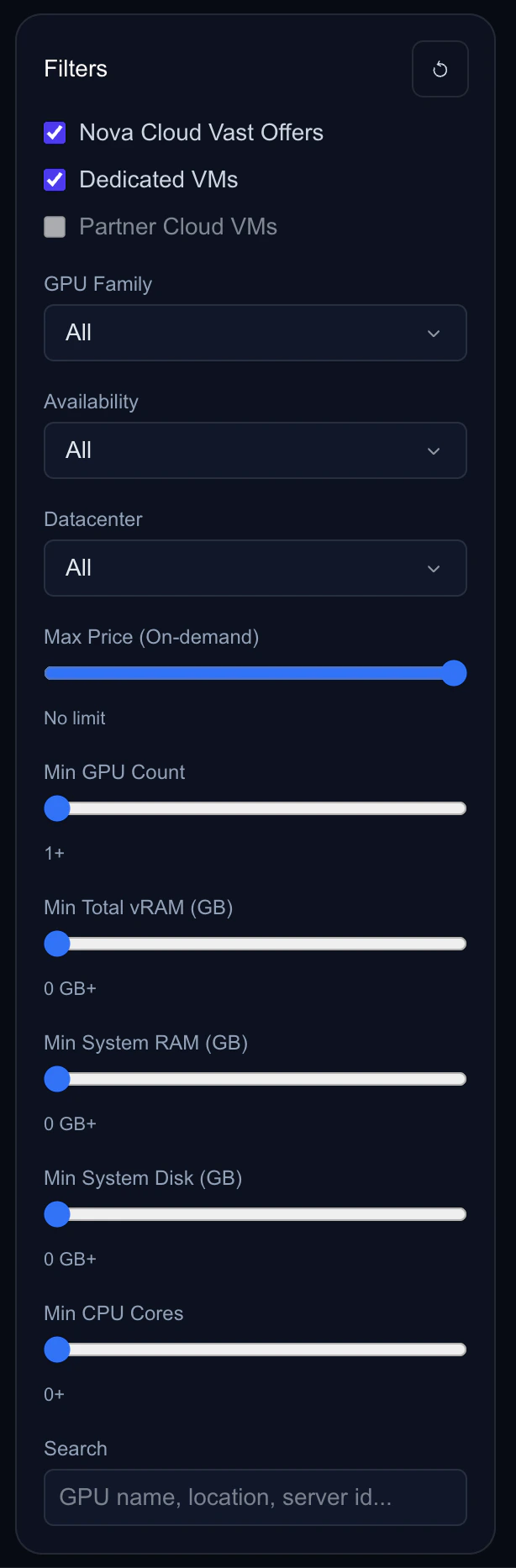
The filter panel lets you narrow down offers to find exactly what you need.
| Field | What It Means |
| ---------------- | ------------------------------------------------------------- |
| **GPU** | The GPU model and count (e.g., "4x RTX 5090") |
| **Price** | Hourly rate — discounted price shown if filtering by reserved |
| **CPU** | Processor model and core count |
| **RAM** | System memory (not GPU memory) |
| **vRAM** | Total GPU memory across all GPUs |
| **Disk** | Available storage capacity |
| **PCIe** | PCIe generation (Gen 5.0 = fastest GPU-to-CPU bandwidth) |
| **Datacenter** | Physical location of the server |
| **Availability** | Whether the offer can be rented right now |
### Offer Sources
You'll see two types of offers:
* **Nova Cloud** — Managed directly by Nova Cloud. Click **Rent Now** to create an instance.
* **Nova Cloud Partners** — Third-party marketplace offers from trusted partners.
## Using Filters
The filter panel lets you narrow down offers to find exactly what you need.
 ### GPU Family
Filter by GPU model:
* **RTX 5090** — Latest generation, 32GB vRAM, best performance
* **RTX 4090** — Previous generation, 24GB vRAM, great value
* **RTX PRO 6000** — Professional grade, 96GB vRAM, ideal for large models
### Rental Type
* **On-Demand** — Standard pricing, no interruption risk
* **Interruptible** — Lowest price, can be preempted
See the [Rental Types guide](/guides/rental-types) for details on each type.
### Reservation Period
When browsing, you can filter by reservation period to see discounted pricing:
* **None** — Pay-as-you-go pricing
* **3 months** — 10% discount
* **6 months** — 20% discount
Offer cards will show the discounted price with a percentage badge when a reservation filter is active.
### Spec Filters
Fine-tune results based on your technical requirements:
| Filter | Range | Use When |
| -------------------- | ----------- | -------------------------------------------------- |
| **GPU Count** | 1–8 minimum | Multi-GPU training (e.g., distributed fine-tuning) |
| **Min vRAM** | 0–1024 GB | Large model loading (e.g., 70B+ parameter models) |
| **Min System RAM** | 0–1024 GB | Data preprocessing, large datasets |
| **Min Disk Space** | 0–16384 GB | Large datasets or model checkpoints |
| **Min CPU Cores** | 0–256 | CPU-intensive preprocessing |
| **Max Hourly Price** | $0–$128 | Budget constraints |
### Search
Use the search bar to filter by GPU name, server ID, or datacenter location.
### Sorting
Sort results to surface the best options:
* **Price (Low → High)** — Find the cheapest option
* **Price (High → Low)** — Find premium hardware
* **GPU Count** — See multi-GPU servers first
* **Max RAM** — Find memory-rich configurations
## Choosing the Right GPU
### By Workload
| Workload | Recommended GPU | Why |
| -------------------------- | ------------------------------------- | -------------------------------------- |
| Fine-tuning 7B–13B models | 1x RTX 4090 (24GB) | Enough vRAM for LoRA/QLoRA fine-tuning |
| Fine-tuning 30B–70B models | 1x RTX PRO 6000 (96GB) or 4x RTX 4090 | Need more vRAM for larger models |
| Stable Diffusion / ComfyUI | 1x RTX 4090 or RTX 5090 | Fast image generation with good vRAM |
| LLM inference (production) | 1x RTX 5090 (32GB) | Best throughput for serving |
| Large-scale training | 4–8x RTX 4090 or RTX 5090 | Distributed training across GPUs |
| 3D rendering | 1x RTX 5090 | Latest architecture, best RT cores |
### By Budget
| Budget | Strategy |
| ----------------------- | ----------------------------------------------------------------------------------------------------------------- |
| **Lowest cost** | Use **Interruptible** rental type with auto-restart enabled. Best for fault-tolerant training with checkpointing. |
| **Best value** | Use **Reserved** with a 3–6 month commitment for 10–20% off. Best for long-running workloads. |
| **Maximum flexibility** | Use **On-Demand**. Pay more per hour but stop anytime with no commitment. |
## Creating Your Instance
Once you've found the right offer:
1. Click **Rent Now** on the offer card
2. You'll be taken to the **Create Instance** page with the GPU pre-selected
### GPU Family
Filter by GPU model:
* **RTX 5090** — Latest generation, 32GB vRAM, best performance
* **RTX 4090** — Previous generation, 24GB vRAM, great value
* **RTX PRO 6000** — Professional grade, 96GB vRAM, ideal for large models
### Rental Type
* **On-Demand** — Standard pricing, no interruption risk
* **Interruptible** — Lowest price, can be preempted
See the [Rental Types guide](/guides/rental-types) for details on each type.
### Reservation Period
When browsing, you can filter by reservation period to see discounted pricing:
* **None** — Pay-as-you-go pricing
* **3 months** — 10% discount
* **6 months** — 20% discount
Offer cards will show the discounted price with a percentage badge when a reservation filter is active.
### Spec Filters
Fine-tune results based on your technical requirements:
| Filter | Range | Use When |
| -------------------- | ----------- | -------------------------------------------------- |
| **GPU Count** | 1–8 minimum | Multi-GPU training (e.g., distributed fine-tuning) |
| **Min vRAM** | 0–1024 GB | Large model loading (e.g., 70B+ parameter models) |
| **Min System RAM** | 0–1024 GB | Data preprocessing, large datasets |
| **Min Disk Space** | 0–16384 GB | Large datasets or model checkpoints |
| **Min CPU Cores** | 0–256 | CPU-intensive preprocessing |
| **Max Hourly Price** | $0–$128 | Budget constraints |
### Search
Use the search bar to filter by GPU name, server ID, or datacenter location.
### Sorting
Sort results to surface the best options:
* **Price (Low → High)** — Find the cheapest option
* **Price (High → Low)** — Find premium hardware
* **GPU Count** — See multi-GPU servers first
* **Max RAM** — Find memory-rich configurations
## Choosing the Right GPU
### By Workload
| Workload | Recommended GPU | Why |
| -------------------------- | ------------------------------------- | -------------------------------------- |
| Fine-tuning 7B–13B models | 1x RTX 4090 (24GB) | Enough vRAM for LoRA/QLoRA fine-tuning |
| Fine-tuning 30B–70B models | 1x RTX PRO 6000 (96GB) or 4x RTX 4090 | Need more vRAM for larger models |
| Stable Diffusion / ComfyUI | 1x RTX 4090 or RTX 5090 | Fast image generation with good vRAM |
| LLM inference (production) | 1x RTX 5090 (32GB) | Best throughput for serving |
| Large-scale training | 4–8x RTX 4090 or RTX 5090 | Distributed training across GPUs |
| 3D rendering | 1x RTX 5090 | Latest architecture, best RT cores |
### By Budget
| Budget | Strategy |
| ----------------------- | ----------------------------------------------------------------------------------------------------------------- |
| **Lowest cost** | Use **Interruptible** rental type with auto-restart enabled. Best for fault-tolerant training with checkpointing. |
| **Best value** | Use **Reserved** with a 3–6 month commitment for 10–20% off. Best for long-running workloads. |
| **Maximum flexibility** | Use **On-Demand**. Pay more per hour but stop anytime with no commitment. |
## Creating Your Instance
Once you've found the right offer:
1. Click **Rent Now** on the offer card
2. You'll be taken to the **Create Instance** page with the GPU pre-selected
 ### Choose an OS Template
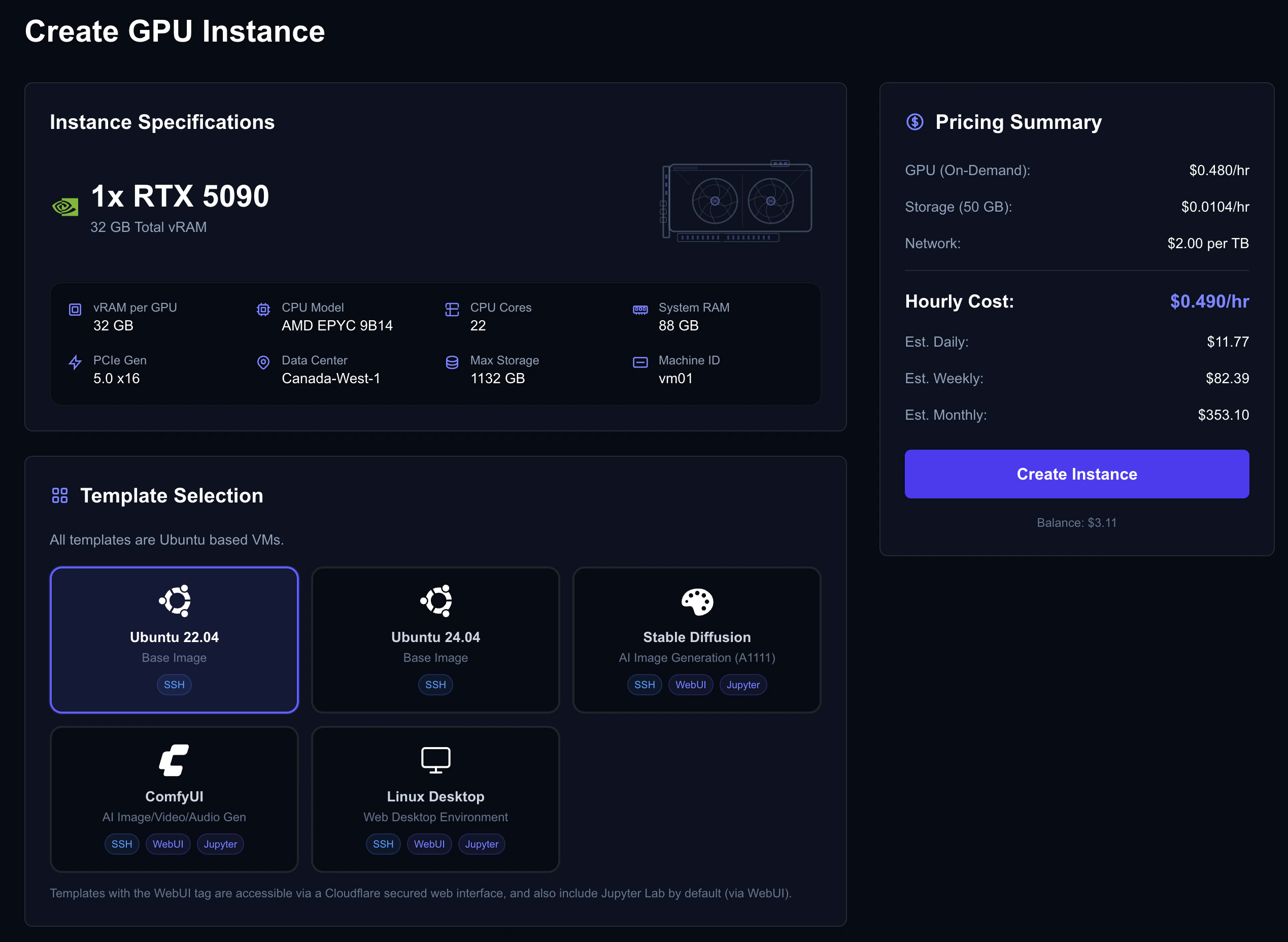
Select a pre-configured environment or start fresh:
| ID | Template | Includes | Best For |
| ----- | -------------------------------------- | --------------------------------- | ------------------------------- |
| `100` | **Ubuntu 22.04 Base** | Clean Ubuntu with NVIDIA drivers | Custom setups |
| `101` | **Ubuntu 24.04 Base** | Latest Ubuntu with NVIDIA drivers | Custom setups (latest packages) |
| `102` | **Stable Diffusion (A1111) + Jupyter** | Automatic1111 WebUI, Jupyter | Image generation |
| `103` | **ComfyUI + Jupyter** | ComfyUI node editor, Jupyter | Advanced image workflows |
| `104` | **Linux Desktop + Jupyter** | Desktop environment, Jupyter | GUI-based work |
Templates with "Jupyter" include a WebUI portal you can access from the console — no SSH required. See the [Connecting guide](/guides/connecting) for details. The ID column is the value to pass as `template_vmid` when creating instances via the [API](/api-reference/introduction#template-ids).
### Configure Storage
Choose your disk size based on your needs:
| Use Case | Recommended Storage |
| --------------------- | ------------------- |
| Basic development | 50–100 GB |
| Model fine-tuning | 100–250 GB |
| Large datasets | 500–1000 GB |
| Multiple large models | 1000+ GB |
Storage is billed separately from GPU time and continues while the VM is stopped. You cannot add storage after you have created the instance, so ensure you choose enough storage for your task.
### Set Up Authentication
Choose how you'll connect:
* **SSH Key** — Select one of your uploaded keys (recommended). See the [SSH Keys guide](/guides/ssh-keys) if you haven't uploaded one yet.
* **Password** — Set a strong password (12+ characters, mixed case, numbers, symbols).
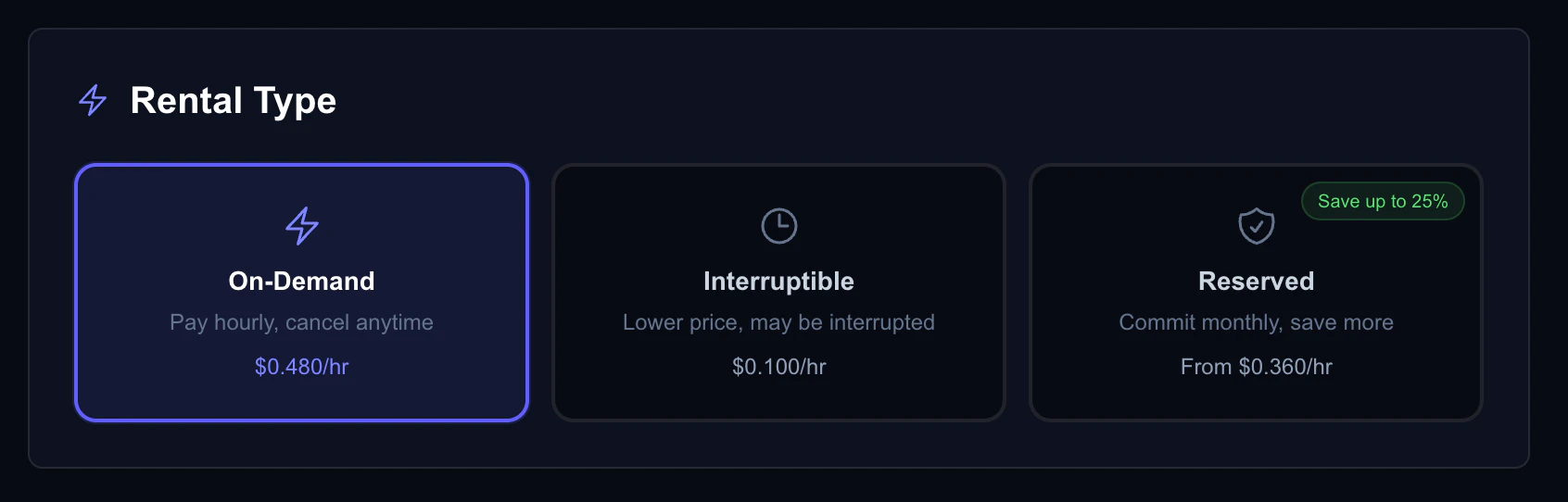
### Select a Rental Type
Choose between On-Demand, Interruptible, or Reserved. The cost estimate updates in real-time as you change options. See the [Rental Types guide](/guides/rental-types) for a detailed comparison of each type.
### Choose an OS Template
Select a pre-configured environment or start fresh:
| ID | Template | Includes | Best For |
| ----- | -------------------------------------- | --------------------------------- | ------------------------------- |
| `100` | **Ubuntu 22.04 Base** | Clean Ubuntu with NVIDIA drivers | Custom setups |
| `101` | **Ubuntu 24.04 Base** | Latest Ubuntu with NVIDIA drivers | Custom setups (latest packages) |
| `102` | **Stable Diffusion (A1111) + Jupyter** | Automatic1111 WebUI, Jupyter | Image generation |
| `103` | **ComfyUI + Jupyter** | ComfyUI node editor, Jupyter | Advanced image workflows |
| `104` | **Linux Desktop + Jupyter** | Desktop environment, Jupyter | GUI-based work |
Templates with "Jupyter" include a WebUI portal you can access from the console — no SSH required. See the [Connecting guide](/guides/connecting) for details. The ID column is the value to pass as `template_vmid` when creating instances via the [API](/api-reference/introduction#template-ids).
### Configure Storage
Choose your disk size based on your needs:
| Use Case | Recommended Storage |
| --------------------- | ------------------- |
| Basic development | 50–100 GB |
| Model fine-tuning | 100–250 GB |
| Large datasets | 500–1000 GB |
| Multiple large models | 1000+ GB |
Storage is billed separately from GPU time and continues while the VM is stopped. You cannot add storage after you have created the instance, so ensure you choose enough storage for your task.
### Set Up Authentication
Choose how you'll connect:
* **SSH Key** — Select one of your uploaded keys (recommended). See the [SSH Keys guide](/guides/ssh-keys) if you haven't uploaded one yet.
* **Password** — Set a strong password (12+ characters, mixed case, numbers, symbols).
### Select a Rental Type
Choose between On-Demand, Interruptible, or Reserved. The cost estimate updates in real-time as you change options. See the [Rental Types guide](/guides/rental-types) for a detailed comparison of each type.
 ### Review & Create
The cost estimate panel shows your projected costs:
### Review & Create
The cost estimate panel shows your projected costs:
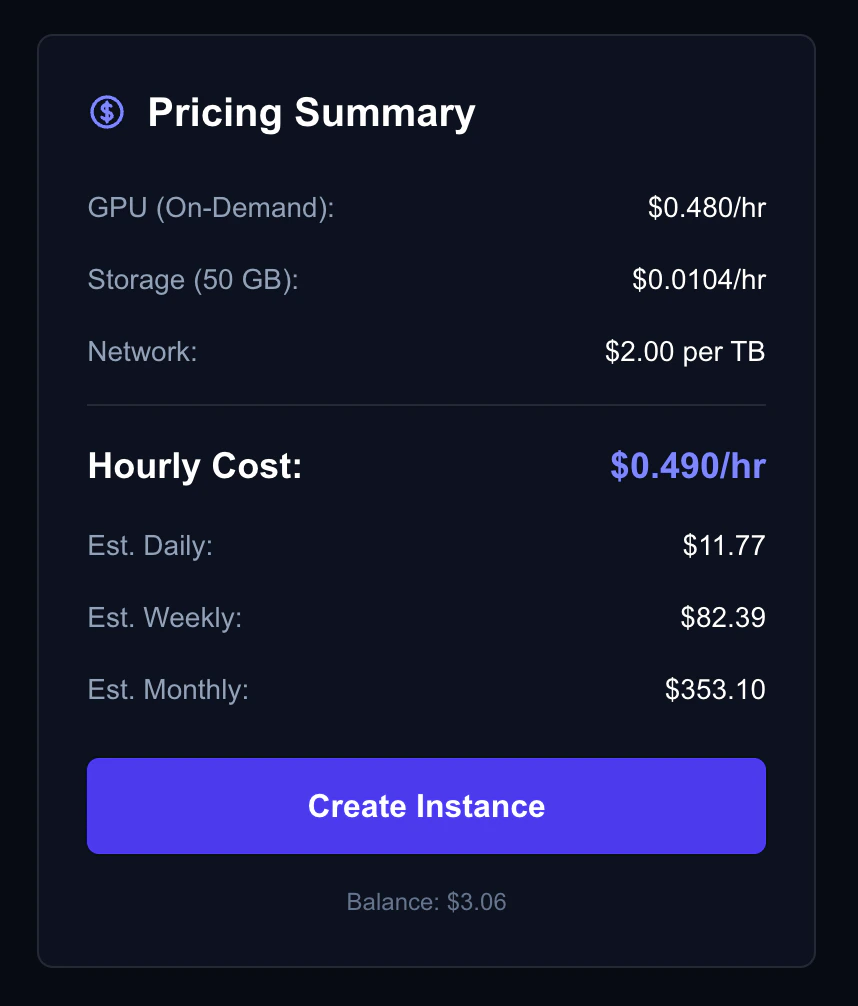 * **Hourly** — GPU + storage cost per hour
* **Daily** — Projected 24-hour cost
* **Weekly** — Projected 7-day cost
* **Monthly** — Projected 30-day cost
* **Reserved deposit** — Upfront amount (if choosing reserved)
Click **Create** and wait 1–10 minutes for your instance to be provisioned.
## What's Next?
Learn how to access your VM via SSH or WebUI.
Open ports for web services, Jupyter, and APIs.
Deep dive into on-demand, interruptible, and reserved pricing.
Understand pricing, auto billing, and invoices.
* **Hourly** — GPU + storage cost per hour
* **Daily** — Projected 24-hour cost
* **Weekly** — Projected 7-day cost
* **Monthly** — Projected 30-day cost
* **Reserved deposit** — Upfront amount (if choosing reserved)
Click **Create** and wait 1–10 minutes for your instance to be provisioned.
## What's Next?
Learn how to access your VM via SSH or WebUI.
Open ports for web services, Jupyter, and APIs.
Deep dive into on-demand, interruptible, and reserved pricing.
Understand pricing, auto billing, and invoices.